Saturday, 7 August 2010

Another week, another build

Get Axdroid 2010-08-07 here!

So, changes since the last one:
  • LCD setup should hopefully be fixed. On the X51v the LCD will no longer flicker, and the X51 should no longer be offset. Hopefully this doesn't break the X50/X50v. Thanks to Max Fierke for the QVGA settings from an X51 :)
  • The 2700g in the X51v and X50v is never going to be truly useful to us, the only thing we can use it for is an unaccelerated framebuffer - which we already have from the PXA270. However - it has 16MiB of RAM that would sure be handy. Now video RAM for us isn't identical to system RAM - generally it's much slower to read from, but it should hopefully be faster than the SD card anyway. So, I've written code that will initialize the 2700g to the point that we can access it's RAM and make use of it as swap space. So now VGA devices have 2 tiers of swap - when system RAM is full the 2700g RAM will be used, and when that fills up the SD card swap.img file will be used. Hopefully this will help speed things up a little for the X51v & X50v.
  • Various small tweaks to maybe help speed it up a little, such as mounting with the noatime option.

Sunday, 1 August 2010

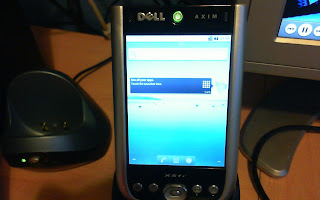
Axdroid Update

Wow, it's been over a month, I think it's about time I put up a new build!

Axdroid Rocking Out!

Changes since the last build:
  • I rewrote my build scripts. Doesn't mean much to you as a user, although the initial hit on the startup time is much reduced now. Dalvik still has to do it's thing and compile everything the first time you boot, but there's no more copying files around.
  • Minor changes/tweaks that might help speed things up a little.
  • You should no longer need to enable mirror mode before booting :)
  • In theory, the LCD should be detected and VGA or QVGA setup as appropriate. That means this build should work on any of X50/X50v/X51/X51v. Though bear in mind that I only own an X51v so that's all it's been tested on.
  • Audio support! I finally figured out the audio setup, and it's quite happily playing me some Paramore :) Headphones do work with the kernel code, but I haven't written the jack detect code yet and I don't think Android provides any manual way to use headphones. So basically: speaker only for now.
So, get it here. It's as simple to run as it can get, drop the files from the zip into the root of an SD card, pop it in the Axim and run bootlinux.exe. Then despite the improvement I'd still recommend you leave it alone for a while and go make a cup of coffee or something. The speed does improve after you use it for a little while as Dalvik compiles and caches everything, but don't expect it to be fast. The problem is that the Axim has 64MB of RAM which is simply not enough for Android. It's worked around by using swap (the swap.img file) but that slows everything down as the system is constantly swapping pages in and out of RAM... I'd be very interested to know how it runs on an Axim which has the 128MB memory upgrade, I'd expect it to fare much better.

Sunday, 27 June 2010

Quick Axdroid Update

So, another days work led to this: axdroid_20100626.zip. The keyguard is now disabled so won't cause problems, the SD card is now accessible (eg. to the Music app) and I did a few things I think may have possibly sped it up slightly (including this being a user rather than eng build). I also reduced the size of the included swap file to 128MiB (from 256MiB). It will still take a fairly long time on the first boot whilst it creates the root filesystem image, so bear that in mind.

Also, for anyone interested, the source for the kernel is now at http://github.com/paulburton/axdroid_kernel

Saturday, 26 June 2010

Axim Android (aka Axdroid) 2.2/Froyo First Test Image

So if you want to try this for yourself, here's how:
  • Download axdroid_20100625.zip
  • Unpack the files from there into the root of an SD card
  • Enable mirror mode on your Axim
  • Open file explorer on your Axim, navigate to the SD card and run haret
  • Click run
  • Wait - for quite a long time
I will reiterate that it runs pretty slowly, and that is especially true on the initial boot since the way I've set it up means that it creates a root filesystem image on the SD card the first time it's run (BTW, make sure the SD card has 200MiB free for that). So you'll see it taking a while to generate that image before Android is run. On further boots the existing image will be reused so it will run much faster. Also, once Android actually runs the Dalvik VM has lots to do, so it will be slow until everything's been compiled by that too. Essentially, run it then go away for half an hour by which time it might have progressed from ultra slow to just slow.

Things to do:
  • Power button
  • Keyguard won't unlock...
    • which makes the Axim a fairly pretty clock if you run Android after the initial boot
    • disable it? Axim has the lock switch anyway
  • SD card mountpoint
    • / is loopback to root.img on the SD card, possible to have the SD card under /mnt/sdcard despite that?
  • Audio
  • Suspend
  • WiFi
  • Bluetooth
  • Speed it up if possible
    • user rather than eng build may make a difference
Finally, if this is interesting to you and you happen to have the problem of just having too much cash I'd love to help you out:

Friday, 25 June 2010

Google stole the past 2 days of my life

Axim X51v running Android 2.2 Froyo :) 


It's pretty slow, but it works! Minus sound, WiFi, suspend (and probably other stuff I've forgotten) that is.

Tuesday, 20 April 2010

Scope control update

Interrupts on the mbed didn't go so well - it's easy enough to get them to run a function, but some timing issues arose and I gave up on that for now. Instead I'm relying on the fact that the Autostar continuously polls for data using the same sequence of bytes - 0x02 0x11 0x02 (which correspond to length 0x02, address 0x11 aka #506 cable and command number 0x02). So, whenever I need to speak to the Autostar I can regain sync by reading data from the Autostar until the last 24 bits read form the value 0x021102 - at which point I'm back in sync and ready to go :) It's a bit of a hack, but it works and is good enough for me. Anyway, with that sorted I was in the position where I could type commands into a terminal to send to the mbed, which would then send them to the scope - but that gets a little tedious. So, this is what I'm using as of now:


It's nice and simple to use, the direction buttons at the top left move the scope at the slew rate selected below. Information about the Autostar system is shown along the top. I'm not sure how much functionality I'm going to implement on the mbed itself, but I definitely don't want it to sit there as a dumb translator between the PC & Autostar - that just seems wasteful, but it doesn't hurt to have control from the PC in addition to whatever I do on the mbed.

I even came up with a crazy scheme which might solve the problems with my mounts tracking - stick my webcam in front of the scopes finder and implement something which would watch for movement and move to compensate and keep things in the same positions in the finder. But that would probably be pretty difficult to get working properly and not 100% exact anyway.

Still, I think it's cool to be able to press a button on the PC and have the scope move around, especially considering how long it took me to get it to work :)

Code for the PC app is at http://github.com/paulburton/autostarcontrol It's built with WebKit/Gtk+ and currently very basic. I'll make the mbed code available at some point soon too.

Thursday, 15 April 2010

It... speaks!!!

Following up on the mbed scope-controlling idea:


I just got this to work after many hours of coffee fueled hacking :) The mbed can now speak the Autostars kinda-i2c-but-kinda-not language, and in the pic there has asked the Autostar to report the scopes product name and firmware date.

Next I need to look into how interrupts work on the mbed, as currently as soon as the mbed leaves the scope alone to do anything else (such as writing to the LCD) it will lose sync with the clock signal the Autostar outputs and communicating won't work anymore.

Then I need to look at the commands for moving the scope and reporting its position, and eventually write the locations of some interesting targets onto the microSD card that you can see there in the top right and hook up some buttons to select one and slew the scope to the correct position :)

I'm definitely a fan of the mbed - it feels much more powerful than the arduino I was using previously, there's a lot of example code and libraries for doing things like the LCD output and SD card read/write, and it's nice to be using a proper C++ compiler. The compiler's web based and seems to fail to save at times, though that could be the fault of the dodgy net connection I'm on at the moment... Still, I've developed a game where I try to guess how many attempts it will take to save the code so it's all good fun :P

Also, it's the day before I go to the star party - so I'm not sure if this counts as a success in my planned timing. It does technically work, even if it doesn't do anything useful yet :)