Saturday, 28 August 2010

LibreDroid!

I believe open source is the right way to do software. If it weren't for open source I certainly wouldn't know as much about computers as I do, and I'm certain it will teach me much more in the future. Plus, we wouldn't have Linux and therefore wouldn't have Android! So, it only seems right that AxDroid also be open :) In theory, you can now build AxDroid (if you have all the tools setup) with the following:

git clone git://github.com/paulburton/axdroid.git
cd axdroid
./build.sh

I'm testing building from a clean checkout now, if you hit any problems in building then do let me know. This is the current script as I'm using, and will be updated as I go, so please don't use the scripts I posted a while ago as they're missing certain things.

EDIT 2010-08-29: Fixed git URL


Tuesday, 10 August 2010

Yup, more Axdroid

New build Axdroid 2010-08-09 here!

Changes since Saturdays build:
  • JIT is enabled. It turns out the fancy new JIT compiler Android 2.2 introduced was disabled for ARMv5TE devices for some reason. This build has it enabled (actually I'm now using the dalvik code from the CyanogenMod ROMs).
  • CompCache is included. This takes a chunk of RAM and uses it as a compressed swap device, so essentially you can fit more in there at the expense of a little processor time doing the (de)compression. I think on the Axim with so little RAM it will be worthwhile.
  • The system apps/frameworks are pre-optimized. This means the Axim doesn't have to do so much work on first boot, so speeds things up a bit. Google for odex or dexpreopt if you want to find out more about that.
  • The MMS and camera apps were removed, they don't make much sense on the Axim.
  • SD card mount permissions have been fixed - Android can write to your SD card and it couldn't before. This means things like album art in the music app now work.
  • I added some code to attempt to figure out which touchscreen model is in use. If X50/X50v users could let me know how it goes that would be great. Basically it looks at the first 100 values it gets and if they look like a X51 series device it assumes that's what it is, otherwise it assumes X50 series. However, having never seen the data from an X50 series device I'm guessing what it will be based on the existing code, so it might be that I'm completely wrong. Also I'm not sure if 100 values will be too few/too many/just right. You might find that it doesn't work for a few seconds then suddenly does work when it decides it's an X50.
  • I changed the key mapping, now it goes:
    • Calendar = menu
    • Contacts = back (I'm considering swapping Calendar/Contacts)
    • Email = end call (not sure if this one is of any use)
    • Home = home (yay!)
    • Wireless = volume up
    • Voice record = volume down
  • Root FS is now using ext4 rather than ext3. Not sure why I chose ext3 to begin with to be honest :s
  • Small tweaks like a boot logo

It seems to me that the speed on my device is now limited by my SD card rather than running out of RAM or anything else. My card is a pretty standard class 2 2GiB one, I may have to invest in a faster one to see if it makes much of a difference. I've also been looking at the internal flash which I think would be much faster than the SD card to read from, but at least for the X51(v) NAND flash it doesn't seem like anyone has ever managed to use the chip with Linux. I've not given in yet though :)


Saturday, 7 August 2010

Another week, another build

Get Axdroid 2010-08-07 here!

So, changes since the last one:
  • LCD setup should hopefully be fixed. On the X51v the LCD will no longer flicker, and the X51 should no longer be offset. Hopefully this doesn't break the X50/X50v. Thanks to Max Fierke for the QVGA settings from an X51 :)
  • The 2700g in the X51v and X50v is never going to be truly useful to us, the only thing we can use it for is an unaccelerated framebuffer - which we already have from the PXA270. However - it has 16MiB of RAM that would sure be handy. Now video RAM for us isn't identical to system RAM - generally it's much slower to read from, but it should hopefully be faster than the SD card anyway. So, I've written code that will initialize the 2700g to the point that we can access it's RAM and make use of it as swap space. So now VGA devices have 2 tiers of swap - when system RAM is full the 2700g RAM will be used, and when that fills up the SD card swap.img file will be used. Hopefully this will help speed things up a little for the X51v & X50v.
  • Various small tweaks to maybe help speed it up a little, such as mounting with the noatime option.

Sunday, 1 August 2010

Axdroid Update

Wow, it's been over a month, I think it's about time I put up a new build!

Axdroid Rocking Out!

Changes since the last build:
  • I rewrote my build scripts. Doesn't mean much to you as a user, although the initial hit on the startup time is much reduced now. Dalvik still has to do it's thing and compile everything the first time you boot, but there's no more copying files around.
  • Minor changes/tweaks that might help speed things up a little.
  • You should no longer need to enable mirror mode before booting :)
  • In theory, the LCD should be detected and VGA or QVGA setup as appropriate. That means this build should work on any of X50/X50v/X51/X51v. Though bear in mind that I only own an X51v so that's all it's been tested on.
  • Audio support! I finally figured out the audio setup, and it's quite happily playing me some Paramore :) Headphones do work with the kernel code, but I haven't written the jack detect code yet and I don't think Android provides any manual way to use headphones. So basically: speaker only for now.
So, get it here. It's as simple to run as it can get, drop the files from the zip into the root of an SD card, pop it in the Axim and run bootlinux.exe. Then despite the improvement I'd still recommend you leave it alone for a while and go make a cup of coffee or something. The speed does improve after you use it for a little while as Dalvik compiles and caches everything, but don't expect it to be fast. The problem is that the Axim has 64MB of RAM which is simply not enough for Android. It's worked around by using swap (the swap.img file) but that slows everything down as the system is constantly swapping pages in and out of RAM... I'd be very interested to know how it runs on an Axim which has the 128MB memory upgrade, I'd expect it to fare much better.

Sunday, 27 June 2010

Quick Axdroid Update

So, another days work led to this: axdroid_20100626.zip. The keyguard is now disabled so won't cause problems, the SD card is now accessible (eg. to the Music app) and I did a few things I think may have possibly sped it up slightly (including this being a user rather than eng build). I also reduced the size of the included swap file to 128MiB (from 256MiB). It will still take a fairly long time on the first boot whilst it creates the root filesystem image, so bear that in mind.

Also, for anyone interested, the source for the kernel is now at http://github.com/paulburton/axdroid_kernel

Saturday, 26 June 2010

Axim Android (aka Axdroid) 2.2/Froyo First Test Image

So if you want to try this for yourself, here's how:
  • Download axdroid_20100625.zip
  • Unpack the files from there into the root of an SD card
  • Enable mirror mode on your Axim
  • Open file explorer on your Axim, navigate to the SD card and run haret
  • Click run
  • Wait - for quite a long time
I will reiterate that it runs pretty slowly, and that is especially true on the initial boot since the way I've set it up means that it creates a root filesystem image on the SD card the first time it's run (BTW, make sure the SD card has 200MiB free for that). So you'll see it taking a while to generate that image before Android is run. On further boots the existing image will be reused so it will run much faster. Also, once Android actually runs the Dalvik VM has lots to do, so it will be slow until everything's been compiled by that too. Essentially, run it then go away for half an hour by which time it might have progressed from ultra slow to just slow.

Things to do:
  • Power button
  • Keyguard won't unlock...
    • which makes the Axim a fairly pretty clock if you run Android after the initial boot
    • disable it? Axim has the lock switch anyway
  • SD card mountpoint
    • / is loopback to root.img on the SD card, possible to have the SD card under /mnt/sdcard despite that?
  • Audio
  • Suspend
  • WiFi
  • Bluetooth
  • Speed it up if possible
    • user rather than eng build may make a difference
Finally, if this is interesting to you and you happen to have the problem of just having too much cash I'd love to help you out:

Friday, 25 June 2010

Google stole the past 2 days of my life

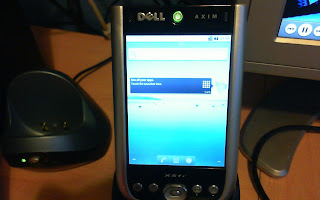
Axim X51v running Android 2.2 Froyo :) 


It's pretty slow, but it works! Minus sound, WiFi, suspend (and probably other stuff I've forgotten) that is.